
Advanced settings
Secondary sign-in methods
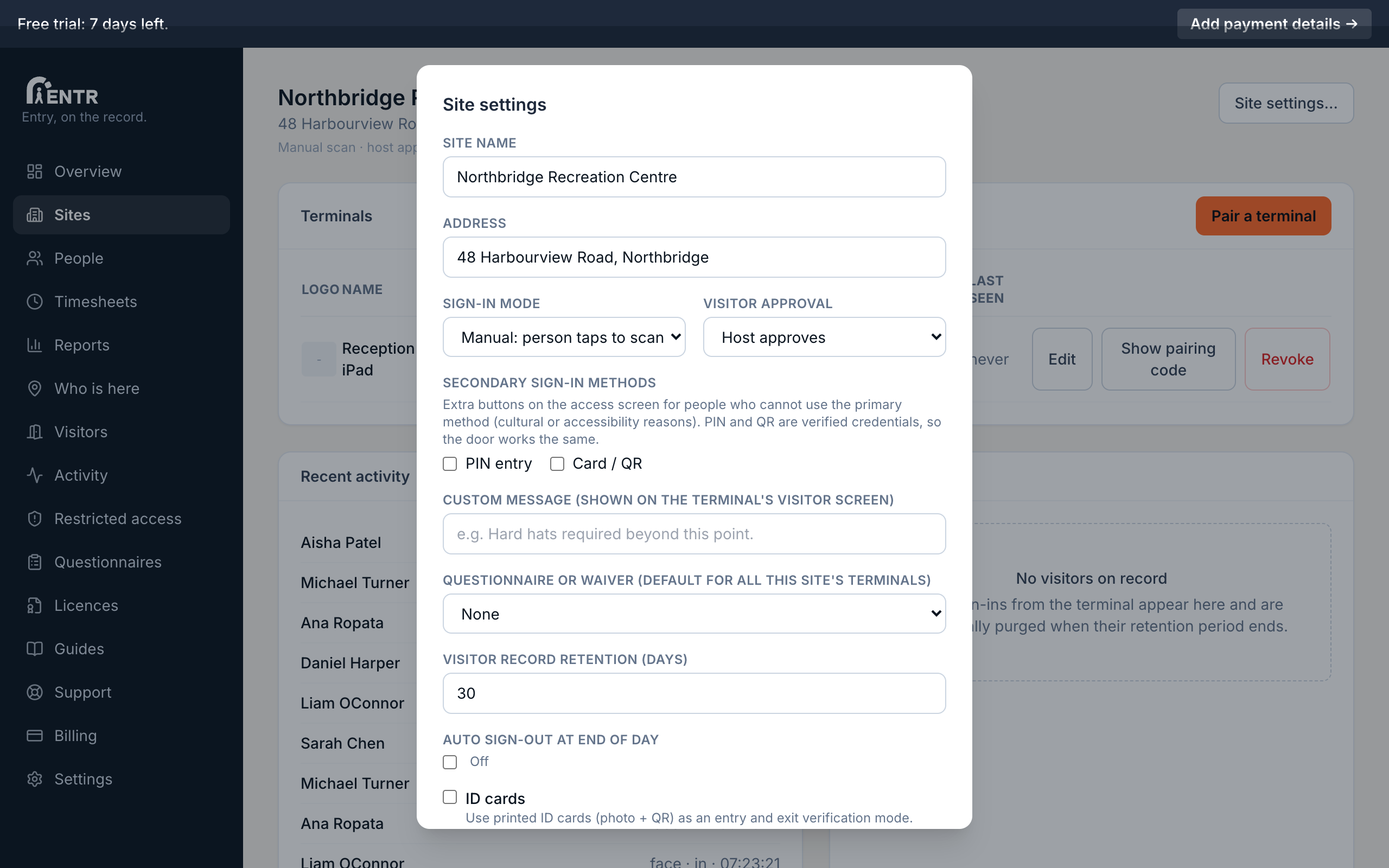
Secondary sign-in methods add PIN or card entry alongside face recognition, so people who cannot or prefer not to enrol a face sign themselves in with exactly the same features. You enable them per site or per terminal.
3 min read · 3 steps
- 1
Why offer a second method
Some people cannot or prefer not to use face recognition: cultural reasons, accessibility, a bandaged face on a building site. Secondary methods keep sign-in self-service for everyone.
- 2
Turn methods on
In Site settings tick PIN entry or Card / QR under Secondary sign-in methods. Matching buttons appear on every terminal at that site. A single terminal can override the site list in its own settings.
- 3
Give people credentials
A PIN or QR credential is issued per person from the People page. Print QR credentials on ID cards so the card itself is the key.
Using iENTR at a centre or school? See how the whole system fits your door.
iENTR for early childhood and schools →Related guides
Try it on one door.
Seven days free, cancel any time. Mount the iPad, pair it with one code and you are running inside half an hour.